Showing posts with label queue. Show all posts
Showing posts with label queue. Show all posts
Whiskey, Sushi and Flow
abstract:
Come participate in a conversation that challenges you to think about everyday implicit flow parameters. Let's chat about my bar, and my frustration while waiting for a temaki on a Japanese restaurant.. These examples will help us understand and talk about flow parameters and queues.

Work item effort and priority; single or dual Queue
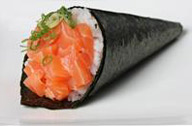
The other day I went to a Japanese restaurant for a
snack.
 |
| Small order - Temaki |
 |
| Large order - Combinado |
I was very hungry and wanted something simple and fast. I ordered one temaki. Unfortunately, it took me more than 30 minutes to get my temaki. Needless to day, I left the restaurant very frustrated and unhappy with the service.
After a few months, I went back to the restaurant and took a look at their kanban system. I noticed that all orders follow a single queue.
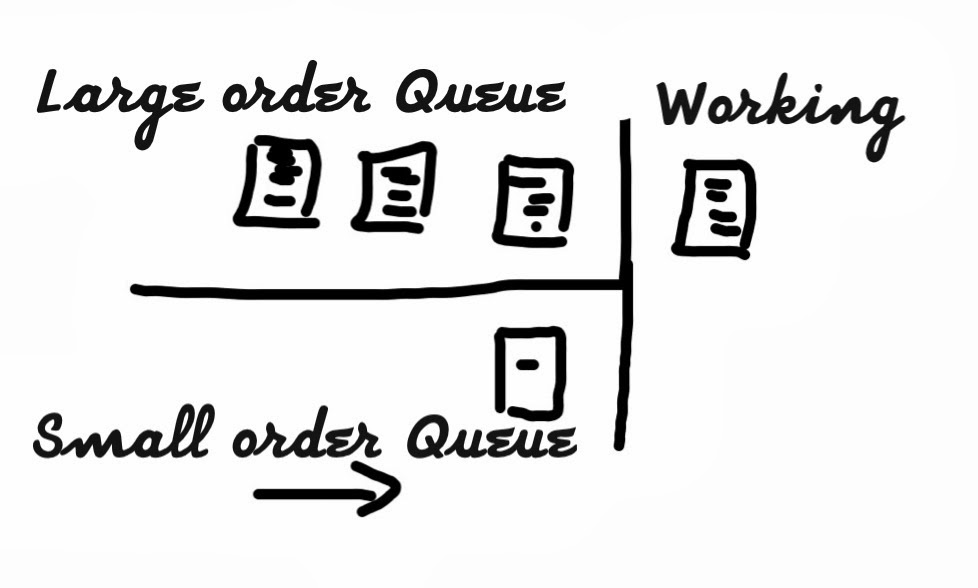
Let me explain the restaurant simple workflow: The waiter collects the order, and then he places it on the suchiman queue. Once the suchiman finishes working on the current order, he picks up the next one from the queue. The drawing below replicates the scenario that happened when I ordered a temaki.
 |
| Single Queue |
My temaki order is the last one on the queue. It has a small line, representing a small snack. The orders in front of it have more lines, representing larger orders.
Consider that each large order takes approximately 10 minutes, and that a small order (my temaki) takes one minute.
Following the single queue workflow my order did take
more than 30 minutes.
Let's now use the same workflow (with the same style of visual management and order control), but with a small change: two queues instead of a single one. Temaki and simple appetizer goes through the small order queue; everything else goes through the large order queue.
 |
| Dual Queue |
Consider that the restaurant changes from a single order queue to the model
represented above. Also, the suchiman gives priority to small order instead of
starting on a large one.
By following this model, my temaki wait time would
have reduced substantially. It would be
at most 11 minutes, instead of at most 41 minutes.
This illustrates the dual queue concept. I am sure you
can relate to it and can name quite a few places you have seen it (or missed it) before.
Software Development Workflow with Queues
Below is an updated representation for the software development workflow. Note that Queue (Q) stages have been added in between the action stages.
 |
| Software Development Workflow with Queues |
The sample Software Development Workflow revisited
Below are two figures: the first is from the previous section representing the software development workflow (without Queue) snapshot. The second carries on the same example snapshot, but with the addition of Queue stages.
 |
| Software Development Workflow sample snapshot without Queues |
 |
| Software Development Workflow sample snapshot with Queues |
Here is a description for what is happening in each workflow stage for the software development workflow example without queues: Two requirements are in analysis. Three requirements are in development while two are being validated. One requirement is ready to release.
For the workflow without Queues, even with cards parked under each stage, it is not clear which ones are actively being worked on. For instance, if you only have two people in this team, it is unlikely they are working on all the cards. How can we tell which ones are being worked on?
This is not the case for the workflow with Queues Note the distinction from the cards that are being worked on in action stages to the ones in Queue stages. Both workflow examples (with and without Queue) have the same number of cards. The workflow example with Queues explicitly shows which cards are active.
These could be workflows for real software development scenarios. For instance, these could be two versions of a card wall for the same team at a given moment. Consider a small Agile team with one analyst and three programmers. The programmers are able to work on design, coding, validation and deployment activities. The workflow with queue stages depicts a more realistic scenario. It tells you what is really under work, and what is still waiting for action. The current status of each activity is more precise. This is only one of the benefits from using Queue stages.

 |  |  |
Subscribe to:
Posts (Atom)